All-in-One Accounting Practice
Management Software
for Accountants, CPAs & Bookkeepers
The best accounting practice management software for firms of every size — manage clients, tasks, deadlines, documents, time and billing in one platform, with WhatsApp and email reminders that chase clients for you.
✓ Full access for 30 days · No credit card required · Cancel anytime
Rated by accounting firms on
See QwikCA in action
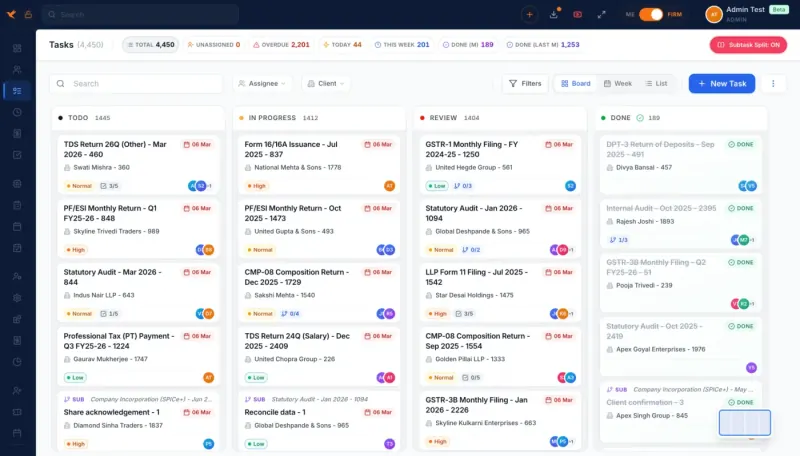
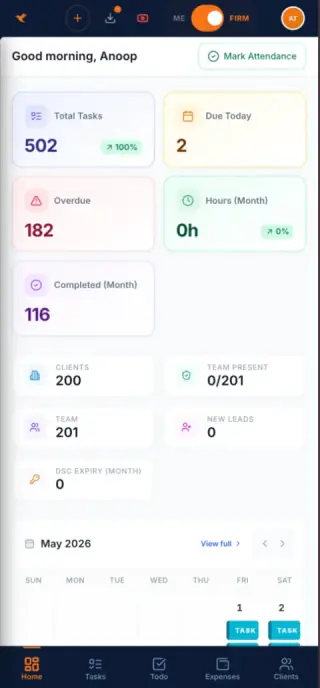
A short tour of the task board, client records, compliance tracking and team tools your firm will use daily.
 Live Demo
Why accounting firms choose QwikCA
Built for accounting firms in
Automate your accounting practice in 3 steps
Onboarding to invoicing in an afternoon, not a quarter.
Onboard Clients
Import clients from Excel or your current tool, or add them manually. Set each client’s year end and filing frequencies once and QwikCA builds their compliance calendar.
Automate Tasks & Reminders
Tasks create themselves for every recurring filing — tax returns, VAT/GST, payroll, annual returns. WhatsApp and email reminders chase clients for documents and fees.
Track, Review & Stay Compliant
Monitor filing status across the firm, get expiry alerts for licences and registrations, and run preparer–reviewer workflows — all from one dashboard.
Every Tool Your Accounting Firm Needs
One login replaces the spreadsheet, the shared inbox and the three other tools your team juggles today.
Task & Workflow Management
Kanban Task Board
Every job sits on a card that moves from Todo through In Progress and Review to Done — drag it, and group the board by client or by return type.
Automated Recurring Tasks
Set once, run forever. Auto-create tax return, VAT/GST, payroll, annual return and custom tasks on schedule — assigned to the right staff automatically.
Deadline & Calendar View
One calendar holds every filing date for every client, and QwikCA nudges the owner before each one falls due.
Staff Task Assignment
Hand work to a named person with a priority, a due date, sub-tasks and a time log attached — so nobody wonders who owns what.
Task Status Tracking
Watch each return and filing move in real time, then slice the board by client, team member, return type or status.
Compliance Analytics
Charts split your filings into pending, overdue and done, so the stage where work piles up is obvious at a glance.
Task Templates & Checklists
Build a template once — sub-tasks, document checklist, who does which step — and every new engagement starts from it.
Manager Review Workflows
Preparer-and-reviewer pipelines route finished work to a manager or a named approver before it can be closed.
Ticket System
Log client questions as tickets with a priority and an owner, and measure how long each one takes to close.
Kanban, List & Week Views
Flip the same work between a Kanban board, a sortable list and a week planner, and drag a card to move its date.
Custom Statuses & Stages
Define the stages each board needs — say Docs In, Preparing, With Reviewer, Filed — in your own colours, with no cap on how many.
AI-Powered Filtering & Search
Ask in plain English — "overdue VAT tasks for retail clients assigned to Sarah" — and let AI build the filter and surface exactly what you need.
Task Dependencies
Link tasks that rely on each other — the tax return waits on the year-end accounts — so the team sees what’s blocking what before anyone starts.
@Mentions in Comments
An @ in any comment pulls in a colleague, a client, a related task, a lead or an email, and the mention opens that record in one click.
Working Users on a Task
Put the junior who prepares, the senior who reviews and the partner who signs off on the same task; it shows in each queue and each logs time to it.
Email Triage & Outlook Integration
Every client email, triaged into work
Link your Outlook mailbox and every client message arrives in QwikCA's triage view. With one click you decide its fate: a fresh task, a lead, or an addition to work already in progress — and the routine ones can become tasks by themselves.
- Any email becomes a task, with the message attached
- New prospects go straight onto the lead board
- File follow-up messages against the right job
- Answer the client without leaving the task

- HTHarbour Textiles10:42Sept purchase ledger for Q3 VAT returnAttached: the purchase ledger and sales summary for September…Task auto-created
- DLDaniel Lim10:15Enquiry: company incorporationHi, we are three partners looking to incorporate a company…Converted to lead
- MEMeridian Exports09:58Corporate tax computation for FY 2026Can you send the draft computation by Friday? Trial balance…Needs triage
- ANAl Noor TradingYesterdayRe: Payroll tax payment for Q2Payment receipt attached as discussed…Attached to task
Hi, can you send us the draft corporate tax computation for FY 2026 by Friday? I’ve attached the trial balance and the fixed-asset register.
Corporate Tax Return — Meridian Exports
The original email travels with the task
When a message turns into a task, the whole thread rides along — attachments, later replies, everything. Whoever picks it up reads the client's request in full instead of asking a colleague to forward it.
- The full thread and its attachments, one tab away
- One-click reply to the client from the triage view
- Attach a further email or compose a fresh one from the task
- Detach a message that was filed in the wrong place
Email Triage for Outlook & Microsoft 365
Sign in with Microsoft once and your firm’s Outlook mailbox feeds QwikCA directly, so the team triages from one shared queue instead of forwarding mail to each other.
Create Tasks from Emails
One click converts a client message into an assigned task, and the message itself stays attached so the context never gets lost.
Automatic Task Creation
Messages that call for action can be routed onto the board by rule, so nothing waits unread in a personal inbox.
Create Leads from Emails
Spot an enquiry from a prospect? Convert it to a lead and it appears on your pipeline, queued for follow-up.
Attach Emails to Tasks
Pin any message to the job it concerns; the client’s instructions then sit beside the checklist and the team’s comments.
Send Email from a Task
Write to the client from inside the task — request documents, send a computation, confirm a filing — and the thread is logged.
Client Management (CRM)
Client Credentials Vault
Securely store and manage tax authority, company registry and banking portal credentials for every client — all encrypted with bank-level security.
Contact Persons
Keep every person at a client on file — owner, finance lead, director — with their WhatsApp and email a tap away.
Secure Client Portal
Clients log in to their own portal to check where each filing stands, drop in documents and comment on tasks as they happen.
Automated Document Requests
Push a tailored checklist of required documents to clients over WhatsApp and email, then watch items tick off as they upload.
Client Mobile App
A client app on iOS and Android with push alerts, camera document capture and approvals from wherever they are.
Licence & Certificate Tracking
Track trade licences, tax registrations, professional certificates and KYC validity per client, with automated expiry reminders via WhatsApp and email.
Client Groups & Multiple Entities
Manage group structures as one client with many entities — each with its own year end, registrations, contacts and compliance calendar — without duplicating work.
Lead Management & CRM Board
Move prospects along a visual pipeline from New to Contacted, Proposal Sent and Won; a won lead turns into a complete client record in one click.
Secure Document Management
Bank-Level Encrypted Storage
AES-256 encryption on every client file, with a zero-knowledge design so nobody outside your firm can read them.
Client Document Sections
Organize documents by category — financial statements, tax returns, VAT/GST workings, bank statements, agreements, KYC. Each client has a private, access-controlled folder.
Document Version History
Every upload keeps its history: roll back to an earlier version, see what changed, and show a full audit trail on demand.
Automated Communication
WhatsApp Automation
Deadline nudges, document chasers, payment links and filing confirmations go out on WhatsApp from templates you tune per client.
Email Automation
Email templates for due-date reminders, document chasers, invoice delivery and your own firm announcements, all editable.
Configurable Notification Rules
Decide who receives what by return type, fee threshold or filing status, so every notification is deliberate.
Bulk Messaging
Message your whole client base, or one filtered slice of it, in a single send and see delivery and open rates afterwards.
Staff Notifications
Your team hears immediately, in-app and by email, when work is assigned, a date moves, a client uploads or a ticket changes.
Delivery Tracking
See which clients got, opened and answered each reminder, and let QwikCA re-send to the ones who never read it.
Expiry & Renewal Management
Licence & Certificate Expiry Tracking
Track every trade licence, professional certificate and signing credential validity date. Automated reminders weeks before expiry so nothing is ever blocked.
Tax Registrations & Renewals
Monitor VAT/GST registrations, business licences, memberships and permits. Automatic alerts arrive before a registration expires or comes up for renewal.
Credential Password Expiry
Get reminded when portal passwords — tax authority, company registry, banking — are due for rotation. No client login goes stale or gets locked out.
Compliance Due-Date Expiry
Each filing date is tracked with reminders that escalate as it approaches, so no window closes on you or your clients.
Document Validity Tracking
Give KYC records, agreements and certificates an expiry date and QwikCA raises the renewal before it lapses.
Task Templates & Checklists
Recurring jobs start from a saved template — sub-tasks, document checklist and role assignments already filled in.
Staff & Firm Management
Role-Based Permissions
Set, per role, what partners, managers and staff may see, change or remove — down to individual screens and records.
Register In/Out Attendance
A digital attendance register stamps each clock-in and clock-out with time, location and IP, so records cannot be fudged.
Time Logs (Jira-style)
Hours are logged on the task and client they belong to, split billable from non-billable, and roll up into per-client time reports.
Practice Profitability Reports
Reports that show which clients make money, how each person’s output trends, and where fees are leaking — without a spreadsheet.
Firm Organization & Departments
Map out your firm chart. Create departments (Audit, Tax, Bookkeeping, Advisory) and assign staff to different levels with granular permissions.
Staff Mobile App
A staff app for on-site work: clock in with a GPS stamp, photograph expense receipts and update tasks from the client’s office.
Team Dashboard
One screen shows who is overloaded, who has room and what each person still owes, so you can rebalance in a minute.
Leave Management
Leave requests come in online, a manager answers with one click, and approved absences drop straight into the task calendar.
Internal Messaging
Talk about the work where it lives: tag colleagues on tasks and leave notes on client files instead of bouncing to WhatsApp.
Got a unique requirement? We'll build it.
If a feature helps accounting firms on QwikCA, we build it — and ship it free for every practice, from sole practitioners to large multi-office firms. Your feedback shapes the roadmap.
Recently shipped on request
Next up
Simple, Transparent Pricing
Every plan unlocks the full product — choose by headcount, not by feature list.
Prices in USD · billed annually · cancel anytime
Solo
For sole practitioners just getting started
- 1 User
- 2 GB Storage
- Unlimited clients
- All features included
- 30-day free trial
Starter
For small and growing practices
- 10 Users
- 5 GB Storage
- Unlimited clients
- All features included
- 30-day free trial
Growth
Ideal for growing accounting firms
- 20 Users
- 5 GB Storage
- Unlimited clients
- All features included
- 30-day free trial
Scale
For large, multi-partner practices
- 40 Users
- 10 GB Storage
- Unlimited clients
- All features included
- 30-day free trial
Enterprise
For multi-office firms and networks
- 60 Users
- 20 GB Storage
- Unlimited clients
- All features included
- 30-day free trial
The best accounting practice management software for every kind of firm
Accountants, CPAs, tax advisers and bookkeepers run their practices on QwikCA. Explore the guides below for your firm type and region.
Accounting Practice Management Software
Tasks, clients, documents, time and billing — all in one place.
Best Accounting Practice Management Software
How the leading tools compare in 2026 and why firms choose QwikCA.
CPA Practice Management Software
Built for CPA firms — tax season workflows, client portal, review stages.
Practice Management for Accountants
For chartered accountants and sole practitioners of every size.
Bookkeeping Practice Software
Recurring monthly work, document collection and time per client.
Tax Practice Management Software
Deadline engine, organizer requests and preparer–reviewer workflow.
Accounting Workflow Software
Templates, dependencies, custom stages and capacity planning.
Practice Software by Region
Singapore, UAE, Malaysia, Hong Kong, UK, Australia, Canada, USA and more.
Enterprise Accounting Firm Software
For large, multi-office firms and accounting networks.
Ready to modernize your accounting practice?
Start your 30-day free trial today — no credit card required. Full access to every feature.
Practice management tips, monthly
Workflow ideas, deadline checklists and product updates for accounting firms. One email a month, no spam.
We respect your privacy. Unsubscribe at any time.